Configuration
The configuration use the Jetbrains Intellij settings framework and is visibility is on project scope, therefore each project require a new configuration.
In order to configure it: Several shortcut are provided in the plugin, to open the settings on the right page.
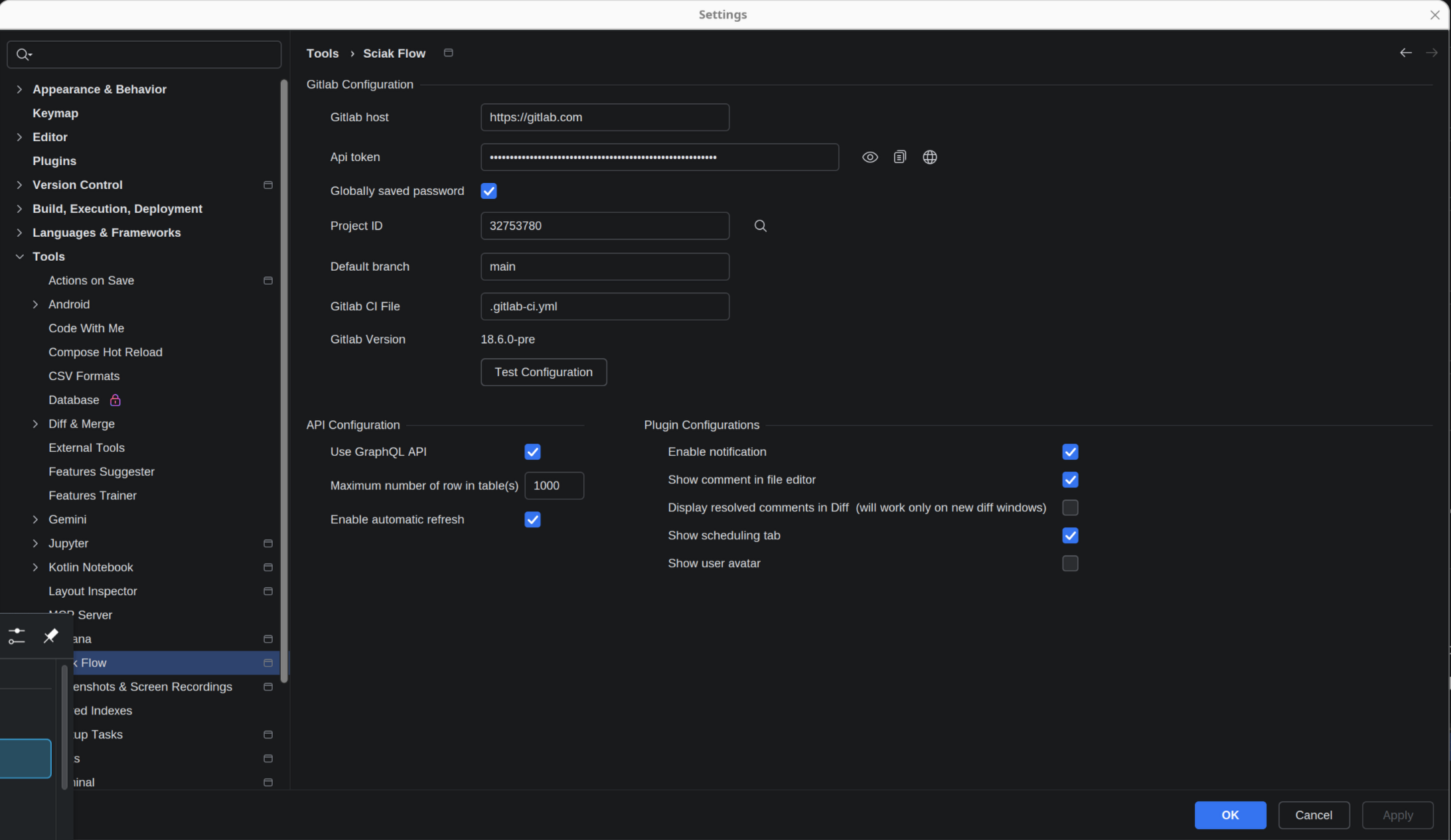
These are the mandatory field to configure:
- Gitlab host
the fully qualified domain name of gitlab installation, it's defaulted to https://gitlab.com Personal Access Token
with grant complete access to API, repository and read of users. The link send you to the page to create a new one.
- Project ID (the numeric one)
the numeric project ID is required, clicking on the lens is possible to search for the project in the list of visible Gitlab project
- Default branch
on project configuration, will take the default branch from the project, but can be changed.
Test configuration
Perform a call to Gitlab API with the configuration in place, allowing to verify if everything is in place correctly. As side effect of the test configuration the default branch is overwritten with the one configured in Gitlab.
If the default branch is different from "main" the change is not overwritten.
Token management
To keep your credentials safe, the plugin integrates with the native IntelliJ IDEA credential storage. Depending on your operating system, your tokens are stored as follows:
Windows: Secured within a KeePass archive.
Linux & macOS: Integrated with your system's native keychain or wallet.
For added flexibility, you can protect your storage with a master password or choose in-memory storage if you prefer not to persist tokens on disk.
Token Rotation
For GitLab instances version 16.11 or higher, the plugin supports automated token rotation. This allows you to refresh your credentials without manually generating a new token in the GitLab web interface.
When a rotation is triggered, the plugin automatically replaces the existing token and persists it using the configured storage method.
Other configuration:
- Use GraphQL API
the plugin will use GraphQL API to retrieve the pipeline data, instead of the REST API, require Gitlab >= 16.5 and enable few more feature, like the user in the pipeline. Some customer could disable graphql interfaces, so if you have problem and error, try to disable GraphQL API.
- Maximum number of row in table(s)
the maximum number of row to fetch, this to avoid stress too much the server fetching lot of data and having to wait too much for data upload.
- Show pipeline for current user only
allow to filter out all the pipeline not triggered by the current user
- Enable automatic refresh
when disabled all the tables (pipeline, merge, etc.) are refreshed manually. Can be useful on slow connection or to avoid too many error if network/gitlab instance are unreliable
- Enable pipeline notification
enable/disable a notification when the pipeline start, finish or fail
- Display resolved comments in Diff
By default resolved comments are not shown in the diff pane, having less noise, but is still possible to enable it, if needed.
- Show comments in editor
enable/disable the possibility to have a notification in the editor that there is a comment at a specific line.
- Show scheduling tab
enable/disable the scheduling tab, if the project doesn't use the Gitlab pipeline scheduling feature allows a less bloated interface
Enable/disable feature
Using System properties is possible to enable/disable feature of the plugin that cannot be set in the settings panel. The rationale behind is that this feature are not really stable and/or are useful only for debug reason. The current one are:
easygitlab.traceCallTrace all the HTTP request and response, will make the log big and maybe everything slower, but could be useful in case of issue on networking.
easygitlab.pipeline.schedulerIf false disable the scheduler
easygitlab.pipeline.graphAllow display the pipeline as a graph, this is currently enabled by default, but can be disabled if the pipeline visualization create issues